
Local AI, part 13 of 21
Introduction to Large Language Models (LLMs)
- LLaMA.cpp: Compilation, quantization and benchmarking
- LM Studio: local LLMs with a graphical interface
- LiteLLM: unified LLM gateway
- Ollama: Installation and Getting Started
- vLLM: serving LLMs at scale with high throughput
- MeshLLM: distributed LLM inference over a P2P mesh
- Log Analysis and Troubleshooting with LLMs
- Local Chatbots with LLMs
- Automated Technical Content Generation with LLMs
- Deploying LLMs at Scale with Kubernetes
- Coherence Evaluation in LLMs
- Basic LLM Fine-tuning
- Introduction to Large Language Models (LLMs)
- LLMs on Kubernetes with Helm and ArgoCD
- Local Model Ecosystem
- MCP (Model Context Protocol) and FastMCP
- LLM Model Evaluation and Testing
- LLM Monitoring and Observability
- Open-source vs cloud LLMs: cost, latency, privacy and control
- Advanced Prompt Engineering for LLMs
- LLM Security Testing
Introduction to Large Language Models (LLMs)Local AI
Large Language Models (LLMs) are AI models capable of understanding and generating human-like text. This guide explains fundamental concepts and their application in DevOps environments.
What are LLMs?
LLMs are machine learning models trained on enormous amounts of text that can:
- Understand natural language: Interpret questions and commands in human language
- Generate coherent text: Create documentation, code, or responses
- Solve problems: Help with troubleshooting, log analysis, configuration generation
- Automate tasks: Create scripts, IaC, or workflows
Basic Architecture
Transformers: The Heart of LLMs
Modern LLMs are based on the Transformer architecture, introduced in 2017:
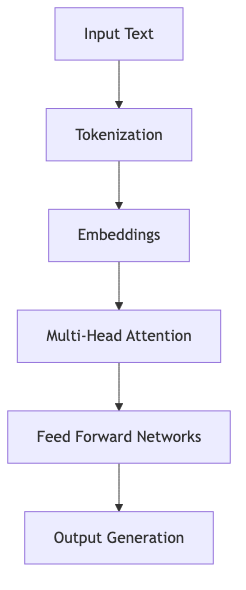
Key components:
- Tokenization: Splits text into processable units
- Embeddings: Converts tokens into numerical vectors
- Attention: Allows the model to focus on relevant parts of context
- Decoder/Encoder: Architectures for different tasks
Open-source vs Proprietary
Open-source Models
Advantages:
- ✅ Full control over data
- ✅ Customization and fine-tuning
- ✅ Runnable locally (privacy)
- ✅ Cost: hardware only
Disadvantages:
- ❌ Requires infrastructure
- ❌ Maintenance and updates
- ❌ May be less “intelligent” than proprietary models
Examples: LLaMA, Mistral, Phi-2, Qwen
Proprietary Models
Advantages:
- ✅ Easy to use (APIs)
- ✅ Automatic updates
- ✅ High performance
- ✅ Technical support
Disadvantages:
- ❌ Vendor dependency
- ❌ Usage costs
- ❌ Privacy concerns
- ❌ Rate limiting restrictions
Examples: GPT-4, Claude, Gemini
DevOps Use Cases
1. Analysis and troubleshooting
# Example: Analyze error logs
User: "My Kubernetes application is failing with 'ImagePullBackOff'"
LLM: "This error indicates Kubernetes cannot download the container image. Possible causes: ..."
2. Documentation generation
- Automatically create README.md files
- Document APIs and configurations
- Generate troubleshooting guides
3. IaC automation
# Generate Terraform configuration
User: "Create an EKS cluster with 3 t3.medium nodes"
LLM: [Generates complete Terraform code]
4. Code review and improvements
- Review code for bugs
- Suggest optimizations
- Explain complex code
5. ChatOps and automation
- Chatbots for technical support
- Incident response automation
- Runbook generation
Tools for running LLMs locally
Ollama
# Simple installation
curl -fsSL https://ollama.ai/install.sh | sh

# Run a model
ollama run llama2
LM Studio
- Intuitive graphical interface
- Model download and management
- Interactive prompt testing
LLaMA.cpp
- Extreme CPU optimization
- Low resource consumption
- Ideal for constrained environments
Performance Considerations
Hardware Requirements
- Basic CPU: 4-8 GB RAM, small models (7B parameters)
- Recommended GPU: NVIDIA with 8GB+ VRAM for medium models
- Production: Multiple GPUs for distributed inference
Optimizations
- Quantization: Reduce model size (GGUF, AWQ)
- Caching: Store frequent prompts
- Batch processing: Process multiple requests together
Security Considerations
Data Privacy
- Local models: data never leaves the environment
- External APIs: review retention policies
- Sanitization: avoid sensitive data in prompts
Model Security
- Prompt injection: Attacks that manipulate behavior
- Jailbreaking: Techniques to bypass restrictions
- Hallucinations: Incorrect responses presented as facts
Next Steps
- Choose your tool: Ollama for simplicity, LM Studio for testing
- Select a model: Start with something small like Llama 2 7B
- Experiment: Test simple prompts and measure responses
- Integrate: Connect with your existing DevOps tools